What is Git?
IntroGit is a distributed version control system for tracking changes in source code during software development. It enables collaboration, branching, merging, and history tracking.
- Distributed: Every user has a full copy of the repository
- Fast, reliable, and widely used in open source and enterprise
- Supports non-linear workflows (branches, merges)
Git vs GitHub / GitLab
Concept- Git: Version control tool (local and remote repositories)
- GitHub/GitLab: Hosting platforms for Git repositories
- Enable collaboration, code review, CI/CD, issue tracking
| Feature | Git | GitHub/GitLab |
|---|---|---|
| Type | Version Control | Hosting Platform |
| Scope | Local & Remote | Remote (Cloud) |
| Features | Branch, Merge, Track | PRs, Issues, CI/CD |
Git Installation & Setup
Setup- Install Git from git-scm.com
- Available for Windows, macOS, Linux
# Windows: Download installer from website
# macOS (Homebrew):
brew install git
# Ubuntu/Debian:
sudo apt update && sudo apt install git
Git Configuration (git config)
Config
- Set user name and email (required for commits)
- Configure editor, colors, aliases, etc.
git config --global user.name "Your Name"
git config --global user.email "you@example.com"
git config --global core.editor "code --wait"
git config --list
Git Lifecycle
Concept- Working Directory: Your local files
- Staging Area (Index): Files marked for commit
- Repository: Committed history (local or remote)

Initializing a Repository (git init)
Init
- Creates a new, empty Git repository in the current directory
- Creates a
.gitfolder to track version history
git init
Cloning a Repository (git clone)
Clone
- Download a remote repository to your local machine
- Creates a directory with all files and history
git clone https://github.com/user/repo.git
Checking Status (git status)
Status
- Show the state of the working directory and staging area
- See which files are modified, staged, or untracked
git status
Adding Changes (git add)
Add
- Stage changes for the next commit
- Can add individual files or all changes
git add file.txt
# Add all changes
git add .
Committing Changes (git commit)
Commit
- Record staged changes to the repository
- Each commit has a unique ID and message
git commit -m "Describe your changes"
Viewing Commit History (git log)
Log
- Show commit history for the repository
- Includes commit IDs, authors, dates, and messages
git log
# One line per commit
git log --oneline
Git Diff (git diff, git diff --staged)
Diff
- Show changes between working directory, staging area, and last commit
- Use
--stagedto see staged changes
git diff
# Show staged changes
git diff --staged
Branching in Git
Branch- Branches allow parallel development and experimentation
- Each branch is an independent line of development
git branch
Creating & Switching Branches
Branch- Create a new branch:
git branch branchname - Switch branches:
git checkout branchnameorgit switch branchname
git branch feature-x
git checkout feature-x
# Or (Git 2.23+)
git switch feature-x
Merging Branches (git merge)
Merge
- Combine changes from one branch into another
- Fast-forward and 3-way merges
git checkout main
git merge feature-x
Resolving Merge Conflicts
Conflicts- Conflicts occur when changes overlap between branches
- Manually edit files to resolve, then add and commit
# After conflict, edit files, then:
git add conflicted-file.txt
git commit
Git Rebase (Basic Concept)
Rebase- Reapply commits from one branch onto another
- Creates a linear history (no merge commits)
git checkout feature-x
git rebase main
Deleting Branches (git branch -d)
Delete
- Delete a branch after merging or if no longer needed
-d(safe delete),-D(force delete)
git branch -d feature-x
# Force delete
git branch -D feature-x
Stashing Changes (git stash)
Stash
- Temporarily save uncommitted changes
- Useful for switching branches without committing
git stash
# List stashes
git stash list
# Apply latest stash
git stash apply
Restoring Files (git restore, git checkout)
Restore
- Restore file(s) in working directory to last committed state
git restore(modern),git checkout(legacy)
git restore file.txt
# Or (older)
git checkout -- file.txt
Undoing Commits (git reset, git revert)
Undo
git reset: Move HEAD and optionally modify index/working directorygit revert: Create a new commit that undoes changes
# Undo last commit (keep changes)
git reset --soft HEAD~1
# Undo last commit (discard changes)
git reset --hard HEAD~1
# Revert a commit (safe for shared repos)
git revert <commit-hash>
Git Remote (git remote add, git remote -v)
Remote
- Connect local repository to remote servers (GitHub, GitLab, etc.)
- List, add, and remove remotes
git remote add origin https://github.com/user/repo.git
git remote -v
Pushing to Remote (git push)
Push
- Upload local commits to a remote repository
- Specify remote and branch
git push origin main
Pulling from Remote (git pull)
Pull
- Fetch and merge changes from a remote repository
- Keep your local branch up to date
git pull origin main
Fetching Changes (git fetch)
Fetch
- Download new commits and branches from remote, but don’t merge
- Review changes before integrating
git fetch origin
Forking & Pull Requests (Conceptual)
Collab- Fork: Copy a repository to your own account (GitHub/GitLab)
- Pull Request (PR): Propose changes to the original repo
- Used for open source collaboration and code review
Tagging Releases (git tag)
Tag
- Mark specific commits as important (e.g., v1.0.0)
- Useful for releases and versioning
git tag v1.0.0
git tag
# Push tags to remote
git push origin v1.0.0
Ignoring Files (.gitignore)
Ignore
- Exclude files/folders from version control
- Common for build artifacts, secrets, dependencies
# Example .gitignore
node_modules/
.env
*.log
/dist
Git Aliases
Alias- Create shortcuts for frequently used commands
- Set in global config
git config --global alias.co checkout
git config --global alias.br branch
git config --global alias.cm "commit -m"
Git Log Customization
Log- Customize log output for better readability
--oneline,--graph,--decorate
git log --oneline --graph --decorate --all
Git Hooks (Intro)
Hooks- Scripts that run automatically on certain Git events
- Examples: pre-commit, pre-push, post-merge
- Located in
.git/hooks/directory
Common Git Workflows
Workflow- Feature Branch Workflow: Create a branch for each feature, merge to main when done.
- Git Flow Workflow: Use
main,develop, feature, release, and hotfix branches for structured releases. - Forking Workflow: Fork repo, work in your copy, submit pull requests to original.
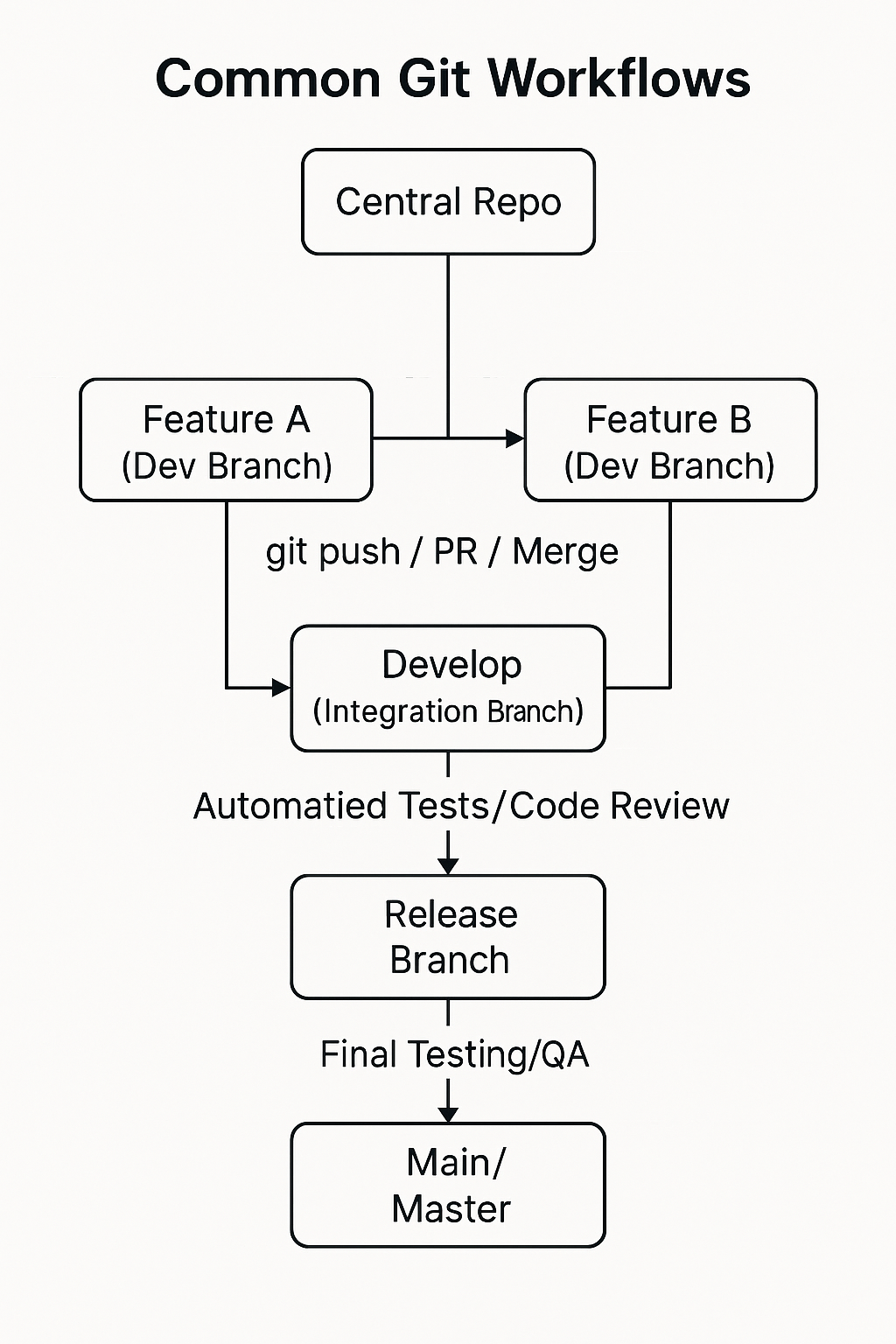
(Above: Feature Branch & Git Flow simplified. Forking workflow: fork → clone → branch → PR.)